Posts

Moving a ClickOnce Installation

Image
A while ago I needed to move a ClickOnce installation to a new URL based on an update I was performing. Now, anyone who is familiar with ClickOnce knows you can migrate an application to a new URL inside Visual Studio by setting up the new "Update Location" in the settings dialog below: In the past, I have bookmarked and followed Robin's guide on how to move a ClickOnce deployment using this standard method. Robin's blog is a one-stop shop for any technical information regarding ClickOnce. However, guess what? It turns out this method does not work if you want to change the CPU type of the application (which is what I wanted to do) or if your certificate has already expired. I wanted to change my application from AnyCPU to x86. Apparently there is nothing you can do about this because the process architecture setting is part of the ClickOnce deployment manifest. Basically I was stuck!! And then I found this stack overflow post about uninstalling a click o...

Load balancing TCP/IP traffic using HAProxy/Nginx

Image
Despite all our best efforts, problems can and do happen in production. If you are practicing CI/CD and continually pushing new code to a server, bugs can sometimes creep in. When that happens you want to be able to inspect, debug and even step-through the code to identify and fix the problem. However, depending on the type of problems they might be hard to reproduce on a dev box. Some problems only occur when you get real live data flowing through the system. For example, if the problem is to do with incoming TCP/IP connections from a specific set of IoT devices, this can be hard to reproduce in dev. Of course, it's considered bad form to debug the code live on the production server. If you are connecting up to an application in debug mode, you're effectively stopping all clients communicating with the server while you step through the code. Not good form! And let's not mention leaving a break-point on and then going for lunch! In this scenario, what you real...

Commodore 64 Basic

Image
Well, that was a nice trip down memory lane! I have just come across the C64 Mini over at https://thec64.com . It's not being released until 2018 but it's a mini replica of the Commodore 64 with USB and HDMI ports. The Commodore 64 was my very first computer. Of course I played the games! Buggy Boy & Commando instantly spring to mind. But the cool thing about the C64 was that it booted up into the basic language! I have fond memories of typing out programs from the back of magazines only for them not to work. The result of a rouge typo somewhere! But I do remember experimenting with the basic language because the user manuals for the computer covered the BASIC language. Amazingly I have just found the manuals preserved online here . Isn't it funny that the GOTO keyword is considered harmful today in software development, but it introduced me to scrolling my name infinitely up a TV screen! 10 PRINT "Ocean Airdrop Woz Here" 20 GOTO 10 RUN Anyway, w...

Reading the contents of emails in an inbox.

The .NET framework comes with a SMTP email client to send out emails in the box and is simple to use: var msg = new MailMessage("oceanairdrop@gmail.com", toList, subject, messageBody); var client = new SmtpClient(server).Send(msg); But recently, I wanted to be able to read the contents of emails in an inbox. Thats when I went searching in the framework only to find out there there is no support for IMAP in the .NET framework. That's when I found Mailkit and its awesome! Mailkit can query in inbox in all sorts of ways and works really well. That brings me to this blog post as its a mental bookmark for me if I ever need to do this kind of thing in the future. To use it, there is nuget package you can use to pull down the library and easily include it in your project: Install-Package MailKit Whats the code like? Well, here is an example of reading an inbox using the library: using (var client = new ImapClient()) { client.ServerCertificateValidationCallback =...

C++ 2017

Image
Wahooo!!! C++ 17 has now been published as an ISO standard!! I haven't used C++ for a long time as C# is my daily driver these days. But I will always remember when I moved from C++ to C#, being so much more productive as the language was a more safer environment and there was less things you had to worry about. However, I always try to keep up-to-date with news over in the C++ camp. The C++ language will always have a special place in my heart and I have plenty of war stories and battle scars!. Yes, C++ is an overly complicated language with years of baggage but with every new feature that is added there is less and less sharp bits to impale yourself on. The only thing I would like the standards committee to do is actually remove old/legacy features from the language. And maybe provide a compiler switch to enable them for backwards compatibility. This would mean you have to opt-in to use those legacy features. Unfortunately I don't think this will ever happen. Of course...

INotifyPropertyChanged & Fody

We all know what the INotifyPropertyChanged interface does. It can be used to raise an event when a property of a class changes. Then in another section of code we can subscribe to these events and perform certain actions based on the application needs. It's all very cool but also old hat and pedestrian. But the thing with this interface is that you can end up writing a lot of boiler plate code! For example, take this simple person class: public class Person { public string FirstName { get; set; } public string LastName { get; set; } public DateTime DateOfBirth { get; set; } } It's nice. It's neat.. All is good with the world. But then you decide you want to be notified when one of the fields in the class is changed, so we introduce the INotifyPropertyChanged interface. Suddenly, for every property we find ourselves expanding the above code like this: private string m_firstName; public string FirstName { get { return m_firstName; } ...

Professional Winform Controls & Libraries

Image
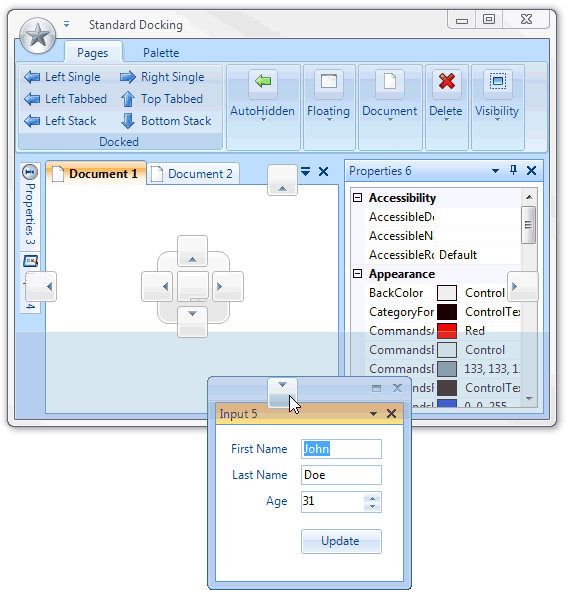
Yes, yes, I know what you’re thinking. Winforms development! But… Erm… Isn’t Winforms dead? I wouldn’t say Winforms is dead - let’s just say it’s “been done”! It’s complete. Whilst the Winforms framework is not as hot or current as it once was, it’s still very capable for a lot of business tasks and needs. And it’s still my go-to choice for developing in-house “line of business apps” that have no need to be online. The fact of the matter is, there are some apps which don’t need to be put on a mobile phone or be accessible from the web. The desktop isn’t going away anytime soon and traditional desktop applications still have their place. These line of business apps can be considered as "dark matter" apps which keeps the cogs of businesses turning. The majority of people will never see them but they are out there being used daily. Good software solves business problems no matter what form it comes in. As developers, we should always be looking for the minimum viable...